2026 How to Build a Plc Hmi Control Panel for Efficient Automation?
The industrial automation landscape is evolving rapidly. Markets are projected to grow significantly. According to a report by MarketsandMarkets, the global industrial automation market will reach $296.70 billion by 2026. This surge fuels the demand for advanced systems like the PLC HMI control panel. Efficient integration of these systems is critical for maximizing productivity.
Building a PLC HMI control panel is no small feat. It requires careful planning and consideration of component specifications. Components must work in harmony to ensure seamless operation. Moreover, many systems still lack the necessary flexibility. As noted in a recent study from ResearchAndMarkets, 30% of automation projects fail to meet their initial goals. Identifying and learning from these shortcomings is essential.
Companies must reflect on their choices. A poorly designed PLC HMI control panel can lead to inefficiencies. Failures often stem from inadequate training or outdated technology. Investing in modern tools and robust strategies can mitigate these risks. Emphasizing human-machine interaction creates a more intuitive user experience. Ultimately, refining the design process can lead to greater success in automation initiatives.

Understanding PLC and HMI: Key Concepts for Automation Control
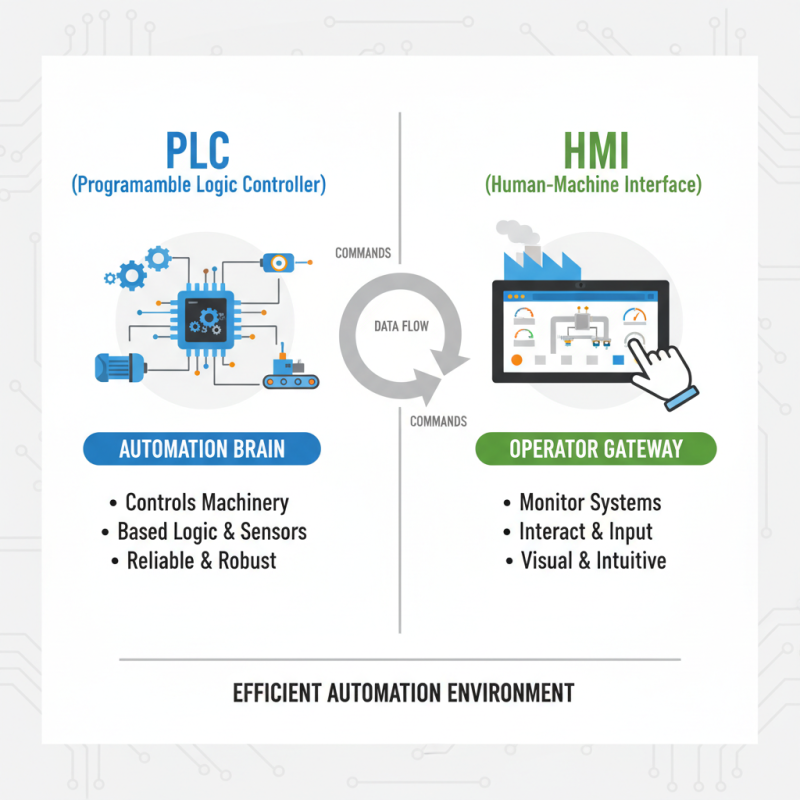
When building a PLC HMI control panel, understanding the key concepts of PLC (Programmable Logic Controller) and HMI (Human-Machine Interface) is crucial. PLCs are the brains of automation systems. They control machinery based on user inputs and conditions from sensors. HMIs provide operators with a gateway to monitor and interact with these systems. Together, they create an efficient automation environment.
Tips: Always start with a clear schematic design. This visual aid helps in organizing your panel components strategically. Keep wiring neat; it reduces errors and eases troubleshooting later on. A tidy workspace can greatly enhance productivity.
Another aspect to consider is user interface design. An intuitive layout allows for quick understanding. Operators need quick access to vital information. Don't clutter the screen. Avoid overwhelming users with too much data. Limit the number of buttons. Simple is powerful.
Creating a robust PLC HMI control panel involves careful planning. It’s easy to overlook minor details, which can lead to complications. Reflection on each step of your design process is essential. Sometimes small tweaks can lead to significant improvements. Use feedback from operators to refine touchpoints. Engage them early in the process.
Essential Components of a PLC HMI Control Panel
Building a PLC HMI control panel involves several essential components. These are critical for efficient automation in various industries.
The heart of the control panel is the PLC itself. It executes programs and processes data. Select a PLC with adequate input and output capabilities. Proper wiring is key, as messy connections can cause malfunctions. Always label wires clearly.
An HMI or Human-Machine Interface allows operators to interact with the system. It should be user-friendly and provide clear displays. Touchscreens are popular. They offer intuitive control. However, pay attention to screen size and resolution. A cramped interface can confuse operators.
Tips: Verify compatibility between the PLC and HMI. Regularly update software for better functionality. Design simple control layouts to avoid operator errors. Don't overlook ventilation in the control panel. Overheating can lead to performance issues. Test your panel thoroughly before deployment. This helps identify potential problems early.
Step-by-Step Guide to Designing Your Control Panel Layout
Designing a control panel layout for a PLC HMI system can seem overwhelming. However, breaking it down into steps makes it manageable. Start by identifying the essential components. These may include the PLC, HMI, power supplies, and input/output devices. Make a list of what you need. It helps clarify your vision.
Next, sketch your layout on paper. Consider the space available for your panel. Group similar components together. This keeps wiring organized. Also, think about accessibility. Will you need easy access to specific controls? Remember, a cluttered layout can lead to confusion. It’s crucial to reflect on usability.
Finally, review your design with fresh eyes. Are there any possible improvements? It’s okay if things don’t seem perfect at first. Building a prototype can help. Test your layout by simulating operation. Often, adjustments will emerge during this stage. Embrace this iterative process for better results.
Wiring and Connecting PLCs and HMIs for Optimal Performance
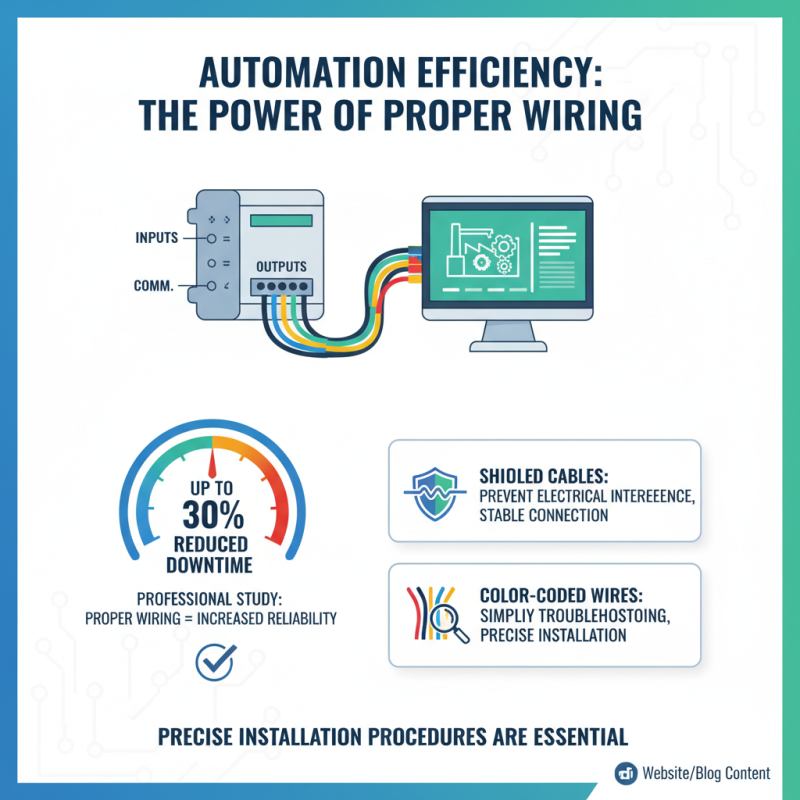
Wiring and connecting PLCs and HMIs is crucial for efficient automation. A professional study indicated that proper wiring can reduce downtime by up to 30%. This emphasizes the need for precise installation procedures. Using shielded cables can help prevent electrical interference, ensuring a stable connection. Consider using color-coded wires to simplify troubleshooting.
The layout of the control panel is also vital. Position the PLC and HMI within easy reach for maintenance. Neat wiring improves airflow, reducing overheating risks. However, many setups neglect wire management, leading to confusion during repairs. It's important to balance aesthetics and practicality in design.
Testing connections before finalizing setups is essential. Many installations face issues due to overlooked connections. Regular audits can identify potential failures early. While aiming for perfection is admirable, mortality in wiring practices reminds us to learn from past mistakes. This ensures a more robust and reliable automation system.
Testing and Troubleshooting Your PLC HMI Control System
Testing and troubleshooting your PLC HMI control system is crucial for achieving optimal automation. According to industry reports, around 30% of automation failures stem from inadequate testing. Regular diagnostics can help identify issues early. Addressing these problems promptly can improve system reliability significantly.
One common pitfall is skipping the testing phase. Many operators mistakenly assume their system works fine after installation. However, real-world conditions can differ from the initial tests. Installing a structured testing protocol can uncover hidden issues. Regularly evaluate response times and communication between PLC and HMI. This fine-tuning can enhance overall performance dramatically.
Moreover, documentation is often neglected. Many teams fail to keep records of past glitches and resolutions. Maintaining a detailed log helps in recognizing recurring issues. Monitoring data trends can lead to informed decisions. Industry data suggests that proper documentation may reduce troubleshooting time by up to 25%. Emphasizing this can foster a culture of continuous improvement.

 Intelligent Manufacturing / Industry 4.0
 Motor Control Center MCC
 Data Center
 Environmental Industry
 Industrial Machinery
 New Energy
 Pharmaceutical Manufacturing
 Petroleum & Chemical
 Marine & Offshore & Ship
 Food processing / agricultural production